Cloud computing has transformed how businesses operate, offering unmatched flexibility, scalability, and cost-efficiency. From startups to global enterprises, organizations are harnessing the cloud to innovate faster and stay competitive in a digital-first world.


What Is Cloud Computing?

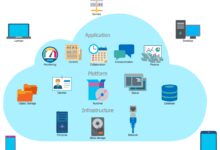
At its core, cloud computing refers to the delivery of computing services—including servers, storage, databases, networking, software, analytics, and intelligence—over the internet (the ‘cloud’). Instead of owning physical data centers or servers, companies can rent access to technology services from cloud providers on a pay-as-you-go basis.
How Cloud Computing Works
Cloud computing operates on a simple yet powerful principle: resources are hosted remotely by a provider and accessed via the internet. Users connect to these resources through web-based applications or APIs, allowing seamless integration with existing systems. This model eliminates the need for on-premise infrastructure, reducing both capital expenditure and maintenance overhead.
- Data is stored and processed on remote servers managed by cloud providers.
- Users access services through secure internet connections using devices like laptops, smartphones, or tablets.
- Resources are dynamically allocated based on demand, ensuring optimal performance.
“The cloud is not about replacing your IT infrastructure—it’s about reimagining it.” — Satya Nadella, CEO of Microsoft
Key Components of Cloud Infrastructure
A robust cloud environment consists of several interconnected components that work together to deliver reliable and scalable services:
- Virtualization: Enables multiple virtual machines to run on a single physical server, maximizing resource utilization.
- Networking: Provides secure, high-speed connectivity between cloud resources and end-users.
- Storage Systems: Offer scalable and redundant storage solutions, including object, block, and file storage.
- Management Tools: Allow administrators to monitor, configure, and optimize cloud environments efficiently.
Major providers like Amazon Web Services (AWS), Microsoft Azure, and Google Cloud Platform offer comprehensive toolsets that abstract much of this complexity for end users.
Types of Cloud Computing Services
Cloud computing is not a one-size-fits-all solution. It comes in various service models, each designed to meet different business needs and technical requirements. Understanding these models helps organizations choose the right approach for their goals.
Infrastructure as a Service (IaaS)
IaaS provides virtualized computing resources over the internet. It gives businesses control over their IT infrastructure without the burden of physical hardware. With IaaS, companies can rent virtual machines, storage, networks, and other fundamental computing resources on demand.
- Examples include Amazon EC2, Microsoft Azure Virtual Machines, and Google Compute Engine.
- Ideal for organizations needing full control over their environment, such as developers or IT teams managing complex applications.
- Offers scalability and flexibility while reducing upfront costs.
According to IBM, IaaS allows businesses to scale up during peak demand and scale down when usage decreases, making it highly cost-effective.
Platform as a Service (PaaS)
PaaS offers a platform allowing customers to develop, run, and manage applications without dealing with the underlying infrastructure. It’s particularly popular among developers who want to focus on coding rather than server maintenance.
- Providers handle OS updates, middleware, and runtime environments.
- Enables rapid application development and deployment.
- Supports collaboration across distributed teams.
Popular PaaS solutions include Heroku, Google App Engine, and Microsoft Azure App Services. These platforms streamline workflows and accelerate time-to-market for new software products.
Software as a Service (SaaS)
SaaS delivers software applications over the internet on a subscription basis. Users access the software via a web browser, eliminating the need for local installation or maintenance.
- Common examples include Google Workspace, Microsoft 365, Salesforce, and Dropbox.
- Automatic updates ensure users always have the latest features and security patches.
- Accessible from any device with an internet connection.
SaaS has become the dominant model for business applications due to its ease of use and low barrier to entry. As reported by Gartner, SaaS adoption continues to grow rapidly across industries.
Deployment Models in Cloud Computing
Different organizations have varying security, compliance, and performance needs. To accommodate this, cloud computing offers multiple deployment models—each with distinct advantages and use cases.
Public Cloud
The public cloud is owned and operated by third-party cloud service providers who deliver resources over the public internet. These resources are shared among multiple organizations (tenants), making it a cost-efficient option.
- Providers include AWS, Microsoft Azure, and Google Cloud.
- Highly scalable and suitable for web-based applications, development environments, and data analytics.
- Operated on a pay-per-use model, minimizing upfront investment.
Public clouds are ideal for businesses looking to scale quickly and reduce infrastructure costs. However, they may not meet strict regulatory requirements for sensitive data.
Private Cloud
A private cloud is dedicated to a single organization. It can be hosted on-premises or by a third-party provider but remains isolated from other customers.
- Offers greater control, security, and customization.
- Commonly used by government agencies, financial institutions, and healthcare providers.
- Higher operational costs due to dedicated infrastructure.
While more expensive than public clouds, private clouds provide enhanced data privacy and compliance capabilities, which are critical for regulated industries.
Hybrid Cloud
The hybrid cloud combines public and private cloud environments, allowing data and applications to be shared between them. This model offers the flexibility to leverage the best of both worlds.
- Enables organizations to keep sensitive data on a private cloud while using public cloud resources for less critical workloads.
- Supports dynamic workload balancing and disaster recovery strategies.
- Facilitates gradual migration to the cloud without disrupting legacy systems.
According to a Cisco report, over 80% of enterprises now use a hybrid cloud strategy to optimize performance and security.
Benefits of Cloud Computing
Cloud computing offers transformative advantages that go beyond simple cost savings. It empowers organizations to innovate, scale, and respond to market changes with unprecedented agility.
Cost Efficiency and Reduced Capital Expenditure
One of the most compelling reasons businesses adopt cloud computing is cost savings. Traditional IT infrastructure requires significant upfront investment in hardware, software licenses, and facilities. The cloud shifts this to an operational expense model.
- No need to purchase and maintain physical servers.
- Pay only for the resources you use—no over-provisioning.
- Eliminates costs related to power, cooling, and physical space.
This financial flexibility is especially beneficial for startups and small businesses that lack large capital reserves.
Scalability and Elasticity
Cloud computing enables instant scaling of resources based on real-time demand. Whether you’re experiencing a traffic spike during a product launch or expanding into new markets, the cloud can adapt instantly.
- Vertical scaling (scaling up): Increase the capacity of existing resources (e.g., RAM, CPU).
- Horizontal scaling (scaling out): Add more instances or servers to distribute load.
- Auto-scaling features automatically adjust resources based on predefined rules.
This elasticity ensures consistent performance without over-provisioning, leading to better user experiences and optimized costs.
Disaster Recovery and Business Continuity
Data loss and downtime can be catastrophic for any business. Cloud computing provides robust disaster recovery solutions that were once only affordable for large enterprises.
- Automated backups and snapshots ensure data integrity.
- Geographically distributed data centers enable failover and redundancy.
- Recovery time objectives (RTO) and recovery point objectives (RPO) are significantly improved.
With cloud-based disaster recovery, businesses can resume operations within minutes after an outage, minimizing financial and reputational damage.
Cloud Computing and Digital Transformation
Cloud computing is not just a technology upgrade—it’s a catalyst for digital transformation. It enables organizations to modernize legacy systems, embrace innovation, and deliver superior customer experiences.
Enabling Innovation and Faster Time-to-Market
The cloud provides a sandbox environment where developers can experiment, build, and deploy applications rapidly. This accelerates the product development lifecycle.
- DevOps practices are easier to implement in the cloud with CI/CD pipelines.
- Microservices architecture allows modular development and independent deployment.
- Access to AI, machine learning, and big data tools fosters innovation.
Companies like Netflix and Airbnb rely heavily on cloud infrastructure to iterate quickly and respond to user feedback in real time.
Supporting Remote Work and Collaboration
The rise of remote work has made cloud computing essential. Cloud-based tools allow employees to access files, applications, and communication platforms from anywhere in the world.
- Google Workspace and Microsoft Teams enable real-time collaboration.
- Cloud storage ensures data consistency across devices.
- Secure access controls protect sensitive information.
During the pandemic, organizations with cloud-ready infrastructures adapted faster to remote operations, highlighting the strategic importance of cloud adoption.
Integration with Emerging Technologies
Cloud computing serves as the foundation for integrating cutting-edge technologies such as artificial intelligence (AI), the Internet of Things (IoT), and blockchain.
- AI and ML models require massive computational power, which the cloud provides on demand.
- IoT devices generate vast amounts of data that can be processed and analyzed in the cloud.
- Blockchain networks benefit from cloud-hosted nodes and decentralized storage.
For example, Google Cloud IoT Core enables businesses to securely connect and manage millions of devices, collect telemetry data, and analyze it in real time.
Security and Compliance in Cloud Computing
Security remains a top concern for organizations considering cloud adoption. While the cloud introduces new risks, it also offers advanced security capabilities that often surpass on-premise solutions.
Common Security Concerns
Despite its benefits, cloud computing raises several security questions:
- Data breaches due to misconfigured settings or weak access controls.
- Shared responsibility model confusion—many assume the provider handles all security, which isn’t true.
- Compliance with regulations like GDPR, HIPAA, or CCPA.
A McAfee report found that misconfigurations are the leading cause of cloud data breaches, emphasizing the need for proper governance.
Best Practices for Cloud Security
To mitigate risks, organizations should adopt a proactive security posture:
- Implement strong identity and access management (IAM) policies.
- Encrypt data at rest and in transit.
- Use multi-factor authentication (MFA) for all user accounts.
- Regularly audit configurations and permissions.
- Leverage cloud-native security tools like AWS Security Hub or Azure Defender.
Additionally, adopting a Zero Trust security model—where no user or device is trusted by default—can significantly enhance protection.
Compliance and Regulatory Standards
Reputable cloud providers comply with major industry standards and certifications:
- AWS holds over 140 compliance certifications, including ISO 27001, SOC 1/2/3, and PCI DSS.
- Microsoft Azure offers compliance coverage for HIPAA, FedRAMP, and GDPR.
- Google Cloud provides tools to help customers meet regulatory requirements.
Organizations must still ensure their own configurations and processes align with these standards, but the cloud provider’s compliance framework provides a solid foundation.
Challenges and Limitations of Cloud Computing
While cloud computing offers numerous advantages, it is not without challenges. Understanding these limitations helps organizations plan effectively and avoid common pitfalls.
Vendor Lock-In and Portability Issues
Once an organization builds its infrastructure on a specific cloud platform, migrating to another can be difficult and costly. Proprietary tools, APIs, and data formats make portability a challenge.
- Different providers have unique service offerings and pricing models.
- Data egress fees can make large-scale migrations prohibitively expensive.
- Lack of standardization across platforms complicates multi-cloud strategies.
To reduce risk, businesses should design applications with portability in mind, use open standards, and consider multi-cloud or hybrid approaches.
Latency and Performance Variability
Although cloud providers offer high-performance infrastructure, latency can still be an issue—especially for applications requiring real-time processing or serving users in remote locations.
- Distance between user and data center affects response times.
- Shared environments may experience performance dips during peak usage.
- Network congestion can impact application reliability.
Solutions include using content delivery networks (CDNs), edge computing, and selecting geographically closer data centers.
Cost Management and Unexpected Expenses
While the cloud can reduce costs, poor management can lead to overspending. Without proper monitoring, organizations may accumulate charges from idle resources, unoptimized instances, or forgotten test environments.
- Implement cloud cost management tools like AWS Cost Explorer or Azure Cost Management.
- Set up budget alerts and usage caps.
- Regularly review and decommission unused resources.
Adopting FinOps (Financial Operations) practices helps teams gain visibility into cloud spending and optimize resource allocation.
Future Trends in Cloud Computing
The evolution of cloud computing is far from over. Emerging trends are shaping the next generation of cloud services, driving innovation and expanding possibilities.
Edge Computing and Decentralized Cloud
Edge computing brings data processing closer to the source—such as IoT devices or user endpoints—reducing latency and bandwidth usage.
- Processes data locally before sending it to the central cloud.
- Crucial for applications like autonomous vehicles, smart cities, and industrial automation.
- Complements cloud computing by offloading real-time tasks.
Providers like AWS (with AWS Wavelength) and Microsoft (Azure Edge Zones) are integrating edge capabilities into their ecosystems.
Serverless Architecture and Function-as-a-Service (FaaS)
Serverless computing allows developers to run code without managing servers. Functions are triggered by events and automatically scaled.
- Reduces operational complexity and improves efficiency.
- Promotes event-driven architectures.
- Cost-effective since you pay only when functions execute.
AWS Lambda, Azure Functions, and Google Cloud Functions are leading FaaS platforms enabling next-gen application development.
AI-Powered Cloud Management
Artificial intelligence is being used to optimize cloud operations, predict failures, and automate resource allocation.
- AI-driven monitoring detects anomalies and prevents outages.
- Machine learning models forecast usage patterns for better capacity planning.
- Automated remediation reduces downtime and manual intervention.
Google’s Cloud Operations suite and AWS DevOps Guru are examples of AI-enhanced cloud management tools.
What is cloud computing?
Cloud computing is the delivery of computing services—such as storage, processing power, and applications—over the internet. Instead of owning physical servers, businesses can rent resources from cloud providers on a pay-as-you-go basis, enabling scalability, cost savings, and remote access.
What are the main types of cloud services?
The three primary types are Infrastructure as a Service (IaaS), Platform as a Service (PaaS), and Software as a Service (SaaS). IaaS provides virtualized infrastructure, PaaS offers development platforms, and SaaS delivers ready-to-use software applications over the internet.
Is cloud computing secure?
Yes, when properly configured. Cloud providers invest heavily in security, but organizations must also follow best practices like encryption, access control, and regular audits. Security is a shared responsibility between the provider and the customer.
What is the difference between public and private cloud?
A public cloud is shared among multiple organizations and managed by a third-party provider, while a private cloud is dedicated to a single organization, offering greater control and security. Hybrid cloud combines both models for flexibility.
How does cloud computing support digital transformation?
Cloud computing enables faster innovation, supports remote work, integrates with AI and IoT, and allows businesses to scale quickly. It serves as the backbone for modern digital strategies, helping companies adapt to changing market demands.
Cloud computing has revolutionized the way organizations manage technology, offering unprecedented flexibility, efficiency, and innovation potential. From cost savings and scalability to enabling digital transformation and supporting emerging technologies, the cloud is no longer optional—it’s essential. While challenges like security, vendor lock-in, and cost management exist, they can be mitigated with proper planning and best practices. As edge computing, serverless architectures, and AI-driven operations shape the future, the cloud will continue to evolve, empowering businesses to thrive in an increasingly digital world.
Further Reading:
